Small offices can cut both costs and environmental impact by extending hardware life, buying refurbished, right-sizing cloud usage, and using certified e-waste recyclers. The highest-impact actions require the least effort because most of a device's footprint is created during manufacturing.
Practical sustainability moves for small offices: extend hardware life, right-size cloud usage, buy greener, and dispose of e-waste responsibly, ranked by effort and impact.
By Editorial teamPublished Last updated 10 min read
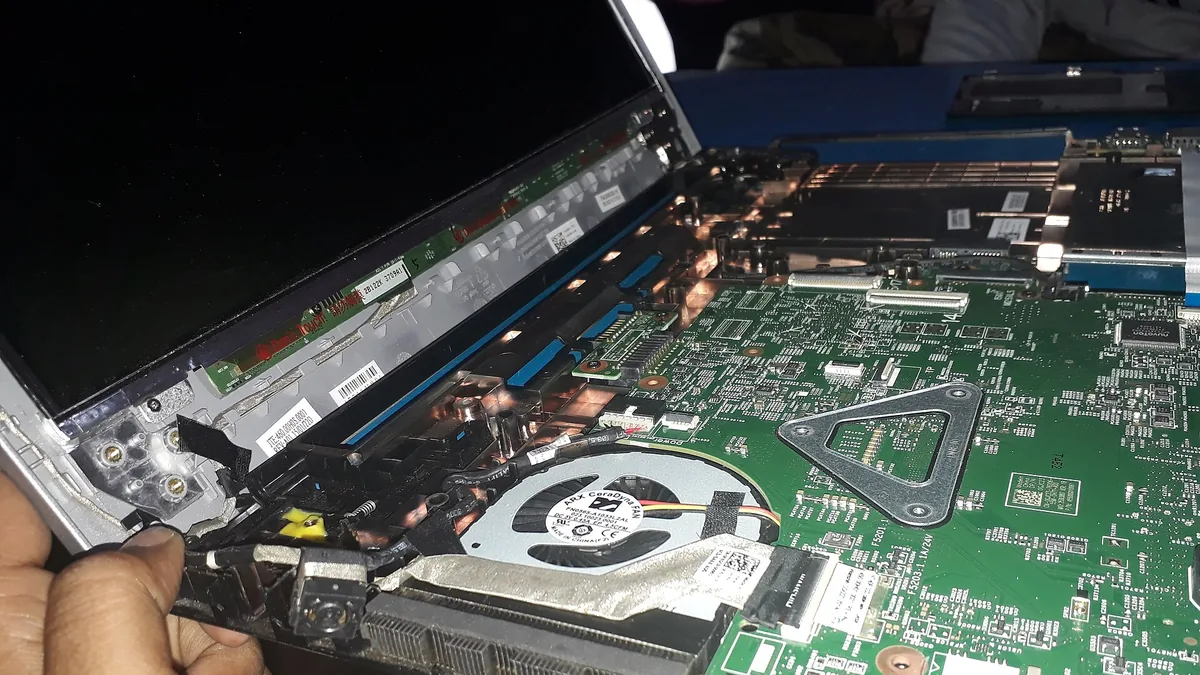
A laptop is repaired at a Kolkata service center, a sustainable practice to extend hardware life. Photo: Solutionservice21, Wikimedia Commons, CC BY-SA 4.0.
Which sustainable tech practices give the best results for the least effort?#
Small offices can cut their technology footprint and their costs at the same time, because most sustainable tech practices are really efficiency practices. The four highest-leverage moves are keeping hardware in service longer, trimming wasted cloud resources, buying refurbished or energy-efficient equipment, and disposing of old devices through certified recyclers instead of the trash. This guide ranks those actions by effort and impact so you can start with the changes that pay for themselves.
How do sustainable tech practices rank by effort and impact?#
Sustainability efforts vary enormously in payoff: some take an afternoon and save thousands of dollars a year, while others require real planning for modest gains. The table below ranks the main practices covered in this article against effort, financial impact, environmental impact, and payback period.
Practice
Effort
Financial impact
Environmental impact
Payback period
Keep devices 5-7 years, repair instead of replace
Low
High
High
Immediate
Buy refurbished business-class hardware
Low
High
High
Immediate
Audit and right-size cloud usage
Medium
Medium to high
Medium
1-3 months
Certified e-waste recycling
Low
Low (possible resale value)
High
Immediate
Power management settings and consolidation
Low
Medium
Medium
Immediate
Green procurement policy
Medium
Low to medium
Medium
6-12 months
Renewable-powered hosting or green web choices
Medium
Low
Low to medium
Varies
The pattern is clear: the cheapest actions are also the most impactful. That is not a coincidence. Most of a computer’s lifetime environmental footprint is created during manufacturing, so anything that delays manufacturing a replacement delivers outsized benefits. For a broader starting point on technology decisions generally, see our small business technology guide.
The most sustainable computer is the one you already own. Manufacturing a single laptop generates the majority of its lifetime carbon emissions before it is ever switched on, and that includes the mining of metals, component fabrication, assembly, and shipping. Every additional year of service you squeeze from a device roughly amortizes that manufacturing footprint over a longer period and delays an expensive replacement purchase.
Practical steps to extend device life:
Buy business-class hardware in the first place. Business laptops are built for serviceability, with replaceable batteries, accessible RAM slots, and standardized parts. Consumer models are often sealed units designed for a three-year life.
Replace batteries, not laptops. A degraded battery is the most common reason people discard an otherwise functional portable. Most business laptops have user-replaceable batteries.
Upgrade before replacing. Adding RAM or swapping a mechanical hard drive for a solid-state drive can make a five-year-old computer feel new. An SSD upgrade alone often transforms an aging machine.
Keep it clean and cool. Dust buildup in fans and vents causes thermal throttling and premature component failure. A quarterly cleaning routine takes minutes.
Use the device until software forces the issue. Plan around operating system support end dates rather than arbitrary three-year refresh cycles. When Windows or macOS support genuinely ends for a machine, that is the real decision point, and it is often year six or seven, not year three.
One caution: do not extend hardware life at the expense of security. A device that no longer receives security updates becomes a liability, especially for nonprofits handling donor or client data. Our nonprofit cybersecurity checklist covers how to assess when an old device crosses that line.
When replacement is genuinely necessary, buy refurbished instead of new. A refurbished off-lease business laptop carries almost no new manufacturing footprint and typically costs a fraction of new. Our refurbished computer buying guide walks through grading standards, warranty expectations, and where to buy.
Cloud services feel weightless, but they run on physical data centers that consume electricity, water for cooling, and manufacturing resources for servers. Hyperscale data centers are usually far more efficient than anything a small office could run itself, so moving to the cloud is generally a net positive. The problem is that most small organizations use the cloud wastefully, paying for resources they forgot about.
Idle virtual machines. A test server spun up for a project in 2022 and never shut down. Cloud VMs bill by the hour whether or not anyone uses them.
Over-provisioned storage. Full-resolution video archives, duplicated backups, and old email attachments on premium storage tiers. Moving cold data to cheaper, lower-tier storage saves money and reduces the resources required to serve it.
Redundant SaaS subscriptions. Three file-sharing services, two video conferencing tools, overlapping features nobody uses. Every subscription represents servers running on your behalf.
Forgotten automation and integrations. Zapier-style workflows and scheduled scripts that run constantly doing work nobody needs anymore.
A practical quarterly audit takes about two hours. Log into each cloud console, list running VMs and storage buckets, and ask one question: what breaks if I turn this off? If the answer is nothing, turn it off. If you are unsure, snapshot it, shut it down, and see who complains within a month.
The CERN Data Centre, a real-world data center, photographed in Auvergne-Rhône-Alpes on 2024-02-23. Photo: Unnerving duck, Wikimedia Commons, CC BY-SA 4.0.
Right-sizing also applies to backup strategy. Keeping multiple redundant copies of everything in high-performance cloud storage is expensive and resource-heavy. A tiered approach, with recent critical data readily accessible and older archives in cold storage, is both cheaper and lighter. Our comparison of cloud backup versus local backup explains how to structure tiers sensibly.
Sustainability in procurement is mostly about buying less, buying better, and buying used. A written policy, even a one-page one, prevents sustainability from depending on whoever happens to place the order that month. A small-office green procurement policy should cover longevity, refurbished defaults, energy labels, device consolidation, and avoidance of disposable peripherals.
What a small-office green procurement policy should cover:
Longevity over price. Prefer serviceable, business-class devices with published repair documentation and replaceable batteries over cheaper sealed consumer models. The lower purchase price rarely survives a total-cost-of-use calculation.
Refurbished as the default. Make refurbished the first option for standard roles (office work, email, web) and new hardware the exception reserved for specialized needs.
Energy labels. In the US, look for ENERGY STAR certification on monitors, printers, and computers. In the EU and elsewhere, comparable energy labeling schemes exist. The differences between models are modest per device but add up across an office.
Consolidate devices. A single multifunction printer beats a printer plus a scanner plus a fax machine. Fewer devices means less manufacturing, less standby power, and less to dispose of eventually.
Avoid disposable peripherals. Rechargeable input devices, standard cables, and repairable headphones beat their disposable equivalents.
How do software choices and budgeting affect procurement sustainability?#
Also consider the software side of procurement. Choosing software your team can actually use reduces abandoned licenses and the hardware upgrades needed to run bloated alternatives. Our comparison of Google Workspace versus Microsoft 365 is relevant here because suite choice affects both licensing costs and device requirements.
Budgeting matters too. A refresh policy that spreads replacements over time, replacing a third of your fleet each year, is more sustainable and more predictable than a big-bang refresh every six years. See our guide to technology budgeting for small organizations for structuring that.
How should a small office dispose of e-waste responsibly?#
Electronics contain materials that make landfill disposal both environmentally harmful and, in many jurisdictions, illegal. Lead, mercury, cadmium, and brominated flame retardants can leach from discarded devices, while valuable metals like gold, copper, and palladium go unclaimed. The responsible path depends on the device’s condition.
If the device still works: donation is usually the best outcome. Schools, community organizations, and refurbishment nonprofits can put a five-year-old laptop into productive service for several more years, which extends its useful life with zero additional manufacturing. Wipe the drive first (see below), and get a receipt for your records.
Computers for recycling in steel mesh pallets at the Mitchell Resource Management Centre in Canberra, January 2013 Photo: Tom Worthington, Wikimedia Commons, CC BY-SA 3.0.
If the device is dead or too old to donate: use a certified recycler. In the US, the two certification programs to look for are R2 (Sustainable Electronics Recycling International) and e-Stewards (Basel Action Network). Both certify recyclers against standards for environmental responsibility, worker safety, and downstream tracking of materials. Certification matters because uncertified “recyclers” have historically shipped container loads of old electronics to developing countries for informal dismantling.
Manufacturer and retailer take-back: most major computer manufacturers (Dell, HP, Lenovo, Apple) operate free or low-cost take-back programs, sometimes even paying shipping. Big-box retailers often run periodic collection events. These are legitimate options when certified recycling is unavailable locally.
Before anything leaves your office, destroy the data. This is the step small organizations most often get wrong, and the consequences (client records, donor lists, financial data ending up on a secondary market) can be severe. Two reliable approaches:
Cryptographic erasure: decrypt the drive, then perform a full overwrite using a recognized wiping tool. This preserves the drive for reuse.
Physical destruction: for high-sensitivity drives, drill through the platters or use a shredding service. Many certified recyclers offer on-site or witnessed shredding.
For phones and tablets, use the built-in factory reset after removing accounts, then confirm the device no longer appears in your management console. For guidance on what data you actually hold and what regulations may apply to it, see our article on data privacy basics for small businesses.
Which small habits reduce an office’s tech footprint?#
Beyond the big four (lifespan, cloud, procurement, disposal), a cluster of low-effort habits compounds over time. None of these habits will transform your footprint alone, but together they reduce energy bills and extend equipment life.
Enable sleep settings on everything. Computers, monitors, and printers idle for most of the day. Modern sleep modes recover instantly, so there is no productivity cost.
Smart power strips. Peripheral “vampire” draw from chargers, speakers, and monitors can be eliminated with a strip that cuts power to accessories when the computer sleeps.
Turn off screensavers. Screensavers keep displays at full power. A blank or sleep state uses a fraction of the energy.
Consolidate printing. Default to duplex and grayscale, and consider whether the document needs printing at all.
Decommission properly. When someone leaves or a project ends, immediately deprovision their accounts, VMs, and subscriptions. Unused resources left running are pure waste. This pairs naturally with offboarding checklists.
What should a small-office sustainability policy include?#
A small office does not need a formal sustainability program to capture most of the value. A one-page internal policy, reviewed annually, is enough for organizations under 50 people. The policy should answer four questions about device lifespans, purchasing, cloud audits, and disposal, with a named owner for each area.
How long do we keep computers, and what triggers replacement? (A support-end-date rule works well.)
What do we buy when we do replace, and from whom? (Refurbished-first, business-class, certified energy labels.)
What cloud resources exist, who owns each one, and when do we audit them? (Quarterly, with a named person responsible.)
What is our disposal procedure, and which recycler do we use? (Certified recycler, documented data destruction.)
Assign each area to a specific person, even if that person is you. Sustainability efforts fail in small organizations not because they are hard but because nobody owns them. The audit, in particular, needs a name attached to it or it will not happen.
What is the most impactful sustainable tech change a small office can make?
Extending the life of existing computers is usually the highest-impact, lowest-cost move. Manufacturing a new laptop creates far more emissions than several years of using it, so keeping devices in service for five to seven years beats replacing them early. It also saves money on procurement and setup time.
How should a small office dispose of old computers?
Never put electronics in the trash. Use a certified e-waste recycler (look for R2 or e-Stewards certification in the US), a manufacturer take-back program, or a donation program if devices still work. Wipe or destroy the storage drives before anything leaves your office.
Does cloud computing help or hurt sustainability?
Large cloud data centers are typically more energy-efficient than small on-site servers, but only if you use them efficiently. Idle virtual machines, forgotten storage, and duplicated backups waste energy and money. Audit your cloud resources regularly and shut down what you no longer use.
Is buying refurbished hardware a good sustainability choice?
Yes, refurbished business-class laptops and desktops are one of the best value and sustainability plays available to small organizations. They avoid most of the manufacturing footprint of a new device and often cost half the price. Buy from reputable refurbishers who offer warranties and clear grading standards.
Learn what refurbished grades really mean, how to vet sellers and warranties, and which specs matter for office work before you buy refurbished computers.